

This year's my last post is flickr like image title edit using jquery, ajax and PHP. I had presented a tutorial in easy way to interacting DOM object with jquery. Hopefully I will present some more new technologies upcoming year on 9lessons.info and global.9lessons.info (Wordpress edition). Happy new year to all my readers and sponsors.

 Download Script
  Live Demo
Sample Database Table Code
image table contains three columns id, title and images.
CREATE TABLE images
(
id INT PRIMARY KEY AUTO_INCREMENT,
title VARCHAR(200),
imageurl TEXT
);
(
id INT PRIMARY KEY AUTO_INCREMENT,
title VARCHAR(200),
imageurl TEXT
);
Javascript Code
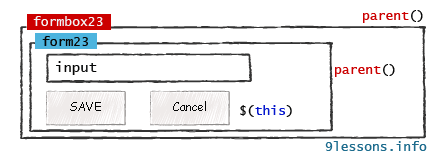
Contains javascipt code. $(".save").click(function(){}- save is the class name of SAVE button. Using $(this).parent().parent().attr("id") calling formbox div id value.
<script type="text/javascript" src="http://ajax.googleapis.com/
ajax/libs/jquery/1.4.2/jquery.min.js"></script>
<script type="text/javascript">
$(function()
{
// Title tag
$("h4").click(function()
{
var titleid = $(this).attr("id");
var sid=titleid.split("title"); // Splitting eg: title21 to 21
var id=sid[1];
var parent = $(this).parent();
$(this).hide();
$("#formbox"+id).show();
return false;
});
// Save Button
$(".save").click(function()
{
var A=$(this).parent().parent();
var X=A.attr('id');
var d=X.split("formbox"); // Splitting Eg: formbox21 to 21
var id=d[1];
var Z=$("#"+X+" input.content").val();
var dataString = 'id='+ id +'&title='+Z ;
$.ajax({
type: "POST",
url: "imageajax.php",
data: dataString,
cache: false,
success: function(data)
{
A.hide();
$("#title"+id).html(Z);
$("#title"+id).show();
}
});
return false;
});
// Cancel Button
$(".cancel").click(function()
{
var A=$(this).parent().parent();
var X= A.attr("id");
var d=X.split("formbox");
var id=d[1];
$("#title"+id).show();
A.hide();
return false;
});
});
</script>
ajax/libs/jquery/1.4.2/jquery.min.js"></script>
<script type="text/javascript">
$(function()
{
// Title tag
$("h4").click(function()
{
var titleid = $(this).attr("id");
var sid=titleid.split("title"); // Splitting eg: title21 to 21
var id=sid[1];
var parent = $(this).parent();
$(this).hide();
$("#formbox"+id).show();
return false;
});
// Save Button
$(".save").click(function()
{
var A=$(this).parent().parent();
var X=A.attr('id');
var d=X.split("formbox"); // Splitting Eg: formbox21 to 21
var id=d[1];
var Z=$("#"+X+" input.content").val();
var dataString = 'id='+ id +'&title='+Z ;
$.ajax({
type: "POST",
url: "imageajax.php",
data: dataString,
cache: false,
success: function(data)
{
A.hide();
$("#title"+id).html(Z);
$("#title"+id).show();
}
});
return false;
});
// Cancel Button
$(".cancel").click(function()
{
var A=$(this).parent().parent();
var X= A.attr("id");
var d=X.split("formbox");
var id=d[1];
$("#title"+id).show();
A.hide();
return false;
});
});
</script>
index.php
Contains HTML and PHP code displaying records form images table.
<?php
include('db.php');
$sql=mysql_query("select id,title,imageurl from images");
while($row=mysql_fetch_array($sql))
{
$id=$row['id'];
$title=$row['title'];
$imageurl=$row['imageurl'];
?>
<div id="formbox<?php echo $id; ?>" style="display:none">
<form method="post" name="form<?php echo $id; ?>">
<input type="text" value="<?php echo $title; ?>" name='content' class='content'/><br />
<input type='submit' value=" SAVE " class="save" />
or
<input type="button" value=" Cancel " class="cancel"/>
</form>
</div>
<h4 id="title<?php echo $id; ?>"><?php echo $title; ?></h4>
<img src="<?php echo $imageurl; ?>" />
<?php } ?>
include('db.php');
$sql=mysql_query("select id,title,imageurl from images");
while($row=mysql_fetch_array($sql))
{
$id=$row['id'];
$title=$row['title'];
$imageurl=$row['imageurl'];
?>
<div id="formbox<?php echo $id; ?>" style="display:none">
<form method="post" name="form<?php echo $id; ?>">
<input type="text" value="<?php echo $title; ?>" name='content' class='content'/><br />
<input type='submit' value=" SAVE " class="save" />
or
<input type="button" value=" Cancel " class="cancel"/>
</form>
</div>
<h4 id="title<?php echo $id; ?>"><?php echo $title; ?></h4>
<img src="<?php echo $imageurl; ?>" />
<?php } ?>
imageajax.php
Contains PHP code updating the images table title column.
<?php
include("db.php");
if($_POST['id'])
{
$id=$_POST['id'];
$title=$_POST['title'];
$id = mysql_escape_String($id);
mysql_query("update images set title='$title' where id='$id'");
}
?>
include("db.php");
if($_POST['id'])
{
$id=$_POST['id'];
$title=$_POST['title'];
$id = mysql_escape_String($id);
mysql_query("update images set title='$title' where id='$id'");
}
?>
CSS Code
h4
{
margin:0px;
padding:0px;
}
h4:hover
{
background-color:#ffffcc;
}
.save
{
background-color:#cc0000;
color:#fff;
padding:4px;
font-size:11px;
border:solid 1px #cc0000;
text-weight:bold;
-moz-border-radius:5px;-webkit-border-radius:5px;
}
.cancel
{
background-color:#dedede;
color:#333;
padding:4px;
font-size:11px;
border:solid 1px #dedede;
-moz-border-radius:5px;-webkit-border-radius:5px;
}
{
margin:0px;
padding:0px;
}
h4:hover
{
background-color:#ffffcc;
}
.save
{
background-color:#cc0000;
color:#fff;
padding:4px;
font-size:11px;
border:solid 1px #cc0000;
text-weight:bold;
-moz-border-radius:5px;-webkit-border-radius:5px;
}
.cancel
{
background-color:#dedede;
color:#333;
padding:4px;
font-size:11px;
border:solid 1px #dedede;
-moz-border-radius:5px;-webkit-border-radius:5px;
}









Don't think you it should let you save if the field is =="", don't you agree? But at a quick look, it looks great, good work.
ReplyDelete=) Gracias!!
ReplyDeleteNice effect... awesome !
ReplyDeleteawesome!
ReplyDeleteI really like the feel of this. I don't use flickr, never saw it before. It would be neat if you focusedthe input field after the title gets clicked --
ReplyDelete$("h4").click(function() {
$("#formbox"+id).show(); // add .focus()
Are you sure that's sanitized, mate?
ReplyDeleteNice man thanks!
ReplyDeleteu rock man
ReplyDeleteThanks, but how do I check for invalid characters and symbols? For example, I don't want symbols to be added, if symbols or something not acceptable was added, return a message.. Thank you.
ReplyDeleteIts a beneficial.
ReplyDeleteMay you give some sugarCrm tips
ReplyDeleteAlmost perfect jus when you delete all the input and then you save it you can not edit again.
ReplyDeleteform id="myform" action="item.php"
ReplyDelete// your code
/form>
how to use ?