

If you are working with mobile web applications, then you must adapt new HTML5 components. This post explains you how to implement new HTML5 input types while creating forms in mobile web projects. Take a look at these screen shots of the new input types in browsers that support in iPhone. and iPad.

Download Script
 Live Demo
Previous Tutorials: Website Design for Mobile Devices and Responsive Web Design and Modernizr implementation for HTML5
type='text'
Usual input type text that display a alphabetical keyboard
<input type="text" name="username" placeholder="Username"/>
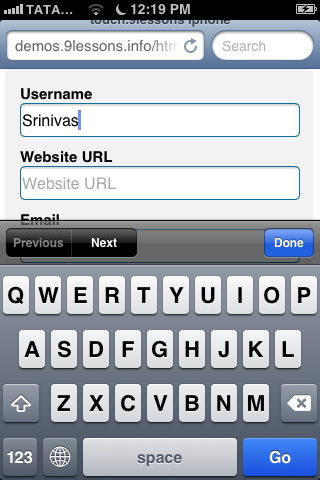
iOS display an @ sign on the keypad
type='url'
iOS shows .com and /, removing the space key
<input type="url" name="url" placeholder="Website URL"/>

type='email'
iOS display an @ sign on the keypad
<input type="email" name="email" placeholder="Email"/>

type='tel'
Smartphone display a numeric keyboard
<input type="tel" name="tel" placeholder="Telephone"/>

type='date'
Smartphone display a numeric keyboard
<input type="date" name="date" placeholder="Date"/>

type='number'
iOS display a numeric keyboard with special characters
<input type="number" name="number" placeholder="Numbers"/>
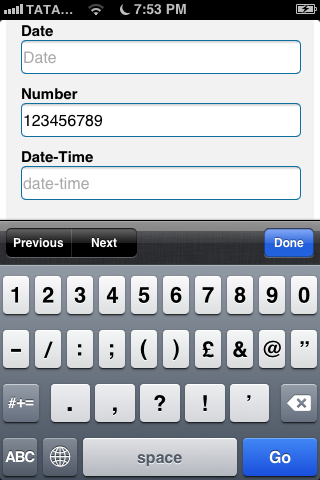









You can also add regular expression patterns to allow only number. Using pattern="\d*" will only display number in the keypad.
ReplyDeleteinput type="text" pattern="\d*" id="session_id" placeholder="Enter a number"
THANKS :)
ReplyDeleteRequired Validation Included ?
ReplyDeleteHey Srinivas, this was really awesome tut man..!
ReplyDeleteIs it working for all mobile browsers or for limited one eh ?
Very nice tutorial!!
ReplyDeleteNice, but what about Android?
ReplyDeleteUseful post :)
ReplyDeleteIf we are typing incorrect web address and mail Id it is highlighted to red, looks nice. Similarly when we type letters instead of numbers in fields where we should type only numbers then also it should be highlighted in red.
ReplyDeleteUseful in this mobile web age>>> Thanks!
ReplyDeleteNice tutorial!
ReplyDeletei have to thank you to benefit me with such a good yutorial
ReplyDeleteIts really amazing. i liked your post.
ReplyDeleteI really enjoy reading your post! Thanks for sharing with us! Delightful!
ReplyDeleteThis is a wonderful tutorial! Thanks for making it easier to understand by writing this post!
ReplyDeletegood tutorial for me.
ReplyDeleteThank you for documenting this! Definitely useful.
ReplyDeleteLove u :) It'S Simple and Smart Example
ReplyDeletegreat tutorial bro.. :)
ReplyDeletei just know the input types. thanks for the info
ReplyDeleteExcellent & well explained Post ! i m so impressed with this useful tutorials . Good work keep it up
ReplyDeleteThanks for the tutorial. It was very easy to follow.
ReplyDeleteVery Nice !!!
ReplyDeleteAre these compatible with android devices also?
ReplyDeleteThanks, Very Informative tutorial! 100 Likesss for making it easier to understand by writing this post! Gud Luck
ReplyDelete