

public static void main(String args[])
{
//your code......
}
Next, the JVM runs everything between the curly braces{} of your main method. Every Java application has to have at least one Class, and at least one main method (not one main per class; just one main per application).
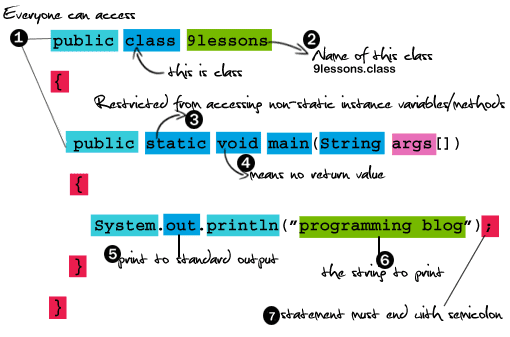
In Java, everything goes in a class. Your'll type your source code file (with a .java extension), then compile it into a new class file (with a .class extension). When your run your program, you're really running a class.
Running a program means telling the Java Virtual Machine (JVM) to "Load the 9lessons class, then start executing its main() method. Keep running till all the code in main is finished.
The main() method is where your program starts running.
9lessons.java
public class 9lessons
{
public static void main(String[] args)
{
System.out.println("Programming Blog");
}
}

step 1: javac 9lessons.java
step 2: java 9lessons
The Big Difference Between public class and Default class
9lessons.java
public class program
{
public static void main(String[] args)
{
System.out.println("Programming Blog");
}
}
Above programe file name is (9lessons.java) and public class name (program) is different

Error : Class program is public, should be declared in a file named program.java
So public class means file name and class name must be same..
Here Default Class(no public)
9lessons.java
class program
{
public static void main(String[] args)
{
System.out.println("Programming Blog");
}
}

After compiling 9lesson.java creates program.class

In the Defalult class no need to give file name and class name same..
step 1: javac 9lessons.java
step 2: java program
If any mistakes please comment me..
Related Articles:
Connecting JSP To Mysql Database Lesson
Web.xml Deployment Descriptor








This comment has been removed by a blog administrator.
ReplyDeletefor your valuable lesson. its gu. go on
ReplyDelete