

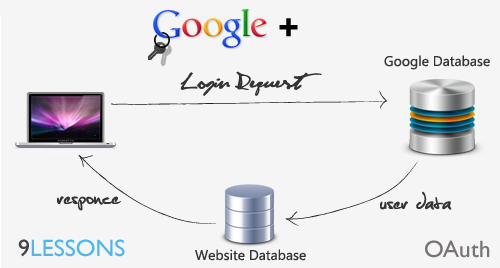
Few days back Google Plus has released OAuth application programming interface, right now they providing only user activities and circle data. I had implemented a simple login system called User authentication with Google Plus data. Try this it’s almost like twitter login system, I hope in future Google + going to release some more options.
 Download Script
  Live Demo
Step 1
Add or register your domain at click here.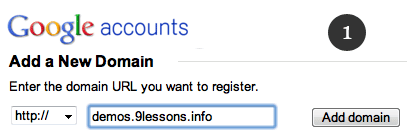
Step 2
Verify your domain ownership with HTML file upload or including META tag.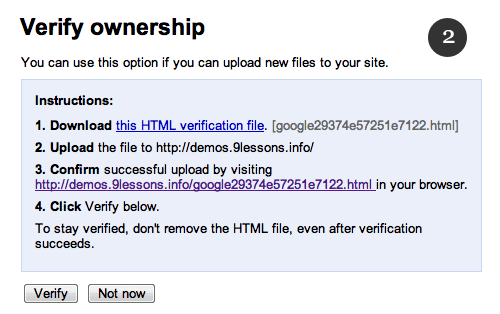
Step 3
Google will provide you OAuth consumer key and OAuth consumer secret key. 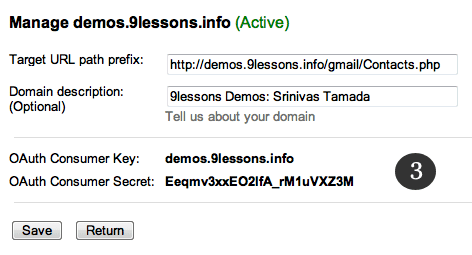
Step 4
Create client ID OAuth Console here. 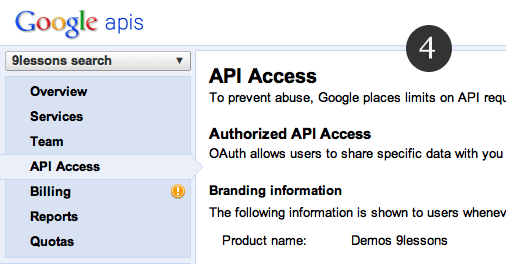
Step 5
Create client ID.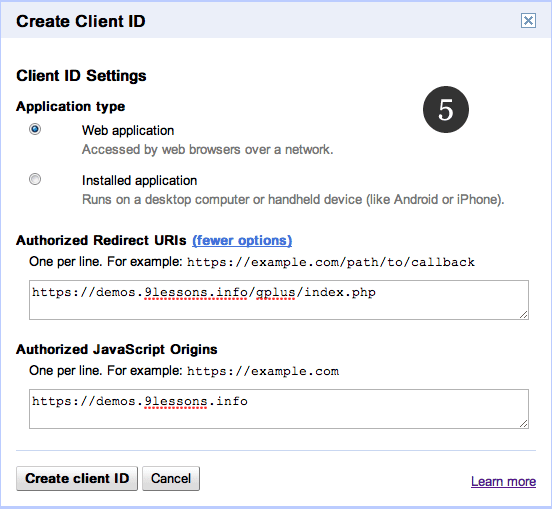
Step 6
Here the application OAuth client ID and client secret.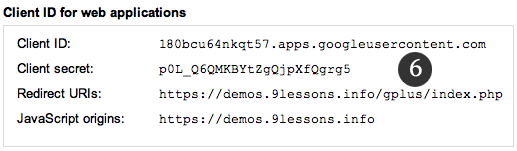
Config.php
Here you have to configure application OAuth keys and Consumer keys.
// OAuth2 Settings, you can get these keys at https://code.google.com/apis/console Step 6 keys
'oauth2_client_id' => 'App Client ID',
'oauth2_client_secret' => 'App Client Secret',
'oauth2_redirect_uri' => 'http://yoursite.com/gplus/index.php',
// OAuth1 Settings Step 3 keys.
'oauth_consumer_key' => 'OAuth Consumer Key',
'oauth_consumer_secret' => 'OAuth Consumer Secret',
'oauth2_client_id' => 'App Client ID',
'oauth2_client_secret' => 'App Client Secret',
'oauth2_redirect_uri' => 'http://yoursite.com/gplus/index.php',
// OAuth1 Settings Step 3 keys.
'oauth_consumer_key' => 'OAuth Consumer Key',
'oauth_consumer_secret' => 'OAuth Consumer Secret',
gplus_login.php
Google plus login system.
<?php
require_once 'src/apiClient.php';
require_once 'src/contrib/apiPlusService.php';
session_start();
$client = new apiClient();
$client->setApplicationName("9lessons Google+ Login Application");
$client->setScopes(array('https://www.googleapis.com/auth/plus.me'));
$plus = new apiPlusService($client);
if (isset($_REQUEST['logout']))
{
unset($_SESSION['access_token']);
}
if (isset($_GET['code']))
{
$client->authenticate();
$_SESSION['access_token'] = $client->getAccessToken();
header('Location: http://' . $_SERVER['HTTP_HOST'] . $_SERVER['PHP_SELF']);
}
if (isset($_SESSION['access_token']))
{
$client->setAccessToken($_SESSION['access_token']);
}
if ($client->getAccessToken())
{
$me = $plus->people->get('me');
$_SESSION['access_token'] = $client->getAccessToken();
}
else
$authUrl = $client->createAuthUrl();
if(isset($me))
{
$_SESSION['gplusdata']=$me;
header("location: home.php");
}
if(isset($authUrl))
print "<a class='login' href='$authUrl'>Google Plus Login </a>";
else
print "<a class='logout' href='index.php?logout'>Logout</a>";
?>
require_once 'src/apiClient.php';
require_once 'src/contrib/apiPlusService.php';
session_start();
$client = new apiClient();
$client->setApplicationName("9lessons Google+ Login Application");
$client->setScopes(array('https://www.googleapis.com/auth/plus.me'));
$plus = new apiPlusService($client);
if (isset($_REQUEST['logout']))
{
unset($_SESSION['access_token']);
}
if (isset($_GET['code']))
{
$client->authenticate();
$_SESSION['access_token'] = $client->getAccessToken();
header('Location: http://' . $_SERVER['HTTP_HOST'] . $_SERVER['PHP_SELF']);
}
if (isset($_SESSION['access_token']))
{
$client->setAccessToken($_SESSION['access_token']);
}
if ($client->getAccessToken())
{
$me = $plus->people->get('me');
$_SESSION['access_token'] = $client->getAccessToken();
}
else
$authUrl = $client->createAuthUrl();
if(isset($me))
{
$_SESSION['gplusdata']=$me;
header("location: home.php");
}
if(isset($authUrl))
print "<a class='login' href='$authUrl'>Google Plus Login </a>";
else
print "<a class='logout' href='index.php?logout'>Logout</a>";
?>
home.php
Contains PHP code inserting Google plus session details into users table.
<?php
session_start();
if (!isset($_SESSION['gplusdata']))
{
// Redirection to home page
header("location: index.php");
}
else
{
$me=$_SESSION['gplusdata'];
echo "<img src='$me['image']['url']; ' />";
echo "Name: $me['displayName']; ";
echo "Gplus Id: $me['id']";
echo "Male: $me['gender']";
echo "Relationship: $me['relationshipStatus']";
echo "Location: $me['placesLived'][0]['value']";
echo "Tagline: $me['tagline'];
print "<a class='logout' href='index.php?logout'>Logout</a> ";
}
?>
session_start();
if (!isset($_SESSION['gplusdata']))
{
// Redirection to home page
header("location: index.php");
}
else
{
$me=$_SESSION['gplusdata'];
echo "<img src='$me['image']['url']; ' />";
echo "Name: $me['displayName']; ";
echo "Gplus Id: $me['id']";
echo "Male: $me['gender']";
echo "Relationship: $me['relationshipStatus']";
echo "Location: $me['placesLived'][0]['value']";
echo "Tagline: $me['tagline'];
print "<a class='logout' href='index.php?logout'>Logout</a> ";
}
?>









Good one. I will try this ...
ReplyDeleteGet friends api?You are the best!!!
ReplyDeleteYou should specify whether your going to save our data in your website or not, privacy option are really important please let us know whether you are going to save our data in your sql tables or not.
ReplyDeleteDemo not connected with database. That is why I'm just displaying insert SQL query.
ReplyDeletehey what if you get SSL error?? whats wrong?
ReplyDeleteWhat if you get "SSL error Unable to make a secure connection to the server. This may be a problem with the server, or it may be requiring a client authentication certificate that you don't have"? what does that mean??
ReplyDeleteThanks Srinivas,
ReplyDeleteI really need this for scriptrr.com
:)
Hi Srinivas, Nice tutorial, is it possible to get the users email address? Usually i want to register users on my site with the provided data from Google in this example. For example, without the email address it's not possible to send a confirmation, activation email to the user who's logging with Google..
ReplyDeletehey Srinivas it is working fine but the response comes in https:// which is generating error SSL connection error... Kindly explain how it can be fixed?
ReplyDeleteHi Srinivas
ReplyDeleteI love your tutorial. I have used few tutoral earlier and it worked fine. Recently I have tried Login using Twitter and Facebook but it did not work. Today I have downloaded your script and modified config file. I have uploloaded config file but did not get "Google Plus Login" link on mu page.
Can you tell me what could have done wrong?
Hi Srinivas,
ReplyDeleteI am also facing the SSL Error.. Please guide me that how i can get Free SSL certificate for my website
@Saqib
ReplyDeleteYou have to buy valid SSL certificate it around $1000 USD.
It won't cost you $1000 for a SSL. I got one from my web host for $29.99 a year. Here is a list of cheap ones and other hosts offer them for very little
ReplyDeletehttp://www.cheapssls.com/?gclid=COSk6IH3l6wCFYXrKgodoUS5Ow
Srinivas.. as i know that your 9lessons is hosted on some Free WebHost then have you purchase SLL separate than your host??????????
ReplyDeleteis this free? & do it really authentic8
ReplyDeleteFor those having problems with SSL, just set as false the "CURLOPT_SSL_VERIFYPEER" flag on the apiCurlIO.php file, method makeRequest. =)
ReplyDeleteHello could you explain to everyone the difference between this post and this one http://www.9lessons.info/2011/07/login-with-google-account.html
ReplyDeleteHello could you explain to everyone the differences between this method and the one here http://www.9lessons.info/2011/07/login-with-google-account.html and maybe which one is better to use?
ReplyDeleteIts really useful tutorial.Thank you.
ReplyDeleteCool I will use this for a project...
ReplyDeleteHi Srinivas,
ReplyDeleteI have seen the live demo (http://www.9lessons.info/2011/10/login-with-google-plus-oauth.html) . Is it any possibility to avoid the Login screen (send EmailId and Passwd through PHP)?
If yes, please let me know the steps.
Thanks in Advance
Palani G.
Finally, Googl eis trying to overtake one by one, first with the Google Plus, Next Hangouts video chat, next came location based status updates, next came Google Plus Pages for business and people and now it came with the OAuth login systems for websites. Good going, but it seems very slow in the field of Social Network. I heard that Microsoft is also planning a "Socl" Network launch soon.
ReplyDeleteHi Sri
ReplyDeleteI wonder if is possible implement a login with the data of a specific "google group" members ?
bye
what means query limits/day is 1000 ? 100 users login 10 times = 1000 ? if is so i better oauth 1.0
ReplyDeleteHi,
ReplyDeleteSrinivas excellent work.
google should not exit their existing api system..becoz most of the poeples are using it
ReplyDeletei really like your articles, this is make me have more idea. thanks.
ReplyDeleteVery good.
ReplyDeleteSeems great!
ReplyDeleteBut why the name and any other info about me is coming, when I am logging-in with Google Plus. you must show name or any any info which can be accessed after logging-in through Google Plus.
Thanks for the very useful info.
Thanks Srinivas,
ReplyDeleteI'm going to use it a website which i'm going to create.
Fatal error: Uncaught exception 'apiIOException' with message 'HTTP Error: (0) couldn't connect to host' in /home/.sites/6/site1542/web/subdomains/lab/gplus/src/io/apiCurlIO.php:120 Stack trace: #0 /home/.sites/6/site1542/web/subdomains/lab/gplus/src/auth/apiOAuth2.php(93): apiCurlIO->makeRequest(Object(apiHttpRequest)) #1 /home/.sites/6/site1542/web/subdomains/user/lab/src/apiClient.php(131): apiOAuth2->authenticate(Array) #2 /home/.sites/6/site1542/web/subdomains/lab/gplus/gplus_login.php(32): apiClient->authenticate() #3 /home/.sites/6/site1542/web/subdomains/lab/gplus/index.php(9): include('/home/.sites/6/...') #4 {main} thrown in /home/.sites/6/site1542/web/subdomains/lab/gplus/src/io/apiCurlIO.php on line 120
ReplyDeletePlease help
ReplyDeletei am getting where i am wrong
Fatal error: Uncaught exception 'apiAuthException' with message 'Invalid token format' in /home/burnin27/public_html/sites/indiatidy/core/oauth2callback/src/auth/apiOAuth2.php:108 Stack trace: #0 /home/burnin27/public_html/sites/indiatidy/core/oauth2callback/src/auth/apiOAuth2.php(74): apiOAuth2->setAccessToken('{? "access_tok...') #1 /home/burnin27/public_html/sites/indiatidy/core/oauth2callback/src/apiClient.php(130): apiOAuth2->authenticate(Array) #2 /home/burnin27/public_html/sites/indiatidy/core/oauth2callback/gplus_login.php(32): apiClient->authenticate() #3 /home/burnin27/public_html/sites/indiatidy/core/oauth2callback/index.php(9): include('/home/burnin27/...') #4 {main} thrown in /home/burnin27/public_html/sites/indiatidy/core/oauth2callback/src/auth/apiOAuth2.php on line 108
The Demo is not working. I checked 2 months ago or so and it did. So I guess there is a update somewhere bugging the code.
ReplyDeleteI downloaded the code and it does not work either. Can someone confirm this?
I dowloaded this on my server and I got the same problem that demo has... it get stuck to the index.php?code=.... Srinivas watch this.
ReplyDeleteGood piece of work though. It gives an idea of what google api are working.
Thanks.
Thanks Srinivas,
ReplyDeleteI have tested it and works fine.I just want to know that can I add any person to my circle or can I send friend request to any person by id or email using gplus api.
Please tell me. I did not find any gplus api for friend invitation.
Thanks in Advanced
Fatal error: Uncaught exception 'apiAuthException' with message 'Invalid token format' in /home/outlaw/public_html/google/gplus/src/auth/apiOAuth2.php:108 Stack trace: #0 /home/outlaw/public_html/google/gplus/src/auth/apiOAuth2.php(74): apiOAuth2->setAccessToken('{? "access_tok...') #1 /home/outlaw/public_html/google/gplus/src/apiClient.php(130): apiOAuth2->authenticate(Array) #2 /home/outlaw/public_html/google/gplus/gplus_login.php(32): apiClient->authenticate() #3 /home/outlaw/public_html/google/gplus/index.php(9): include('/home/outlaw/pu...') #4 {main} thrown in /home/outlaw/public_html/google/gplus/src/auth/apiOAuth2.php on line 108
ReplyDeleteGoogle Plus also the same problem repeated after getting info from G+ it does not get logged out.Even here there is no logout option too so can u pls check it out for log out to G+.
ReplyDeleteThanks
I am not able to fetch email id and mobile number from google plus account. Please help me.
ReplyDeleteHow can i fetch email id from there.
ReplyDeletedoesent work for me
ReplyDeleteFatal error: Uncaught exception 'apiAuthException' with message 'Invalid token format' in /opt/lampp/htdocs/qibo/src/auth/apiOAuth2.php:108 Stack trace: #0 /opt/lampp/htdocs/qibo/src/auth/apiOAuth2.php(74): apiOAuth2->setAccessToken('{? "access_tok...') #1 /opt/lampp/htdocs/qibo/src/apiClient.php(130): apiOAuth2->authenticate(Array) #2 /opt/lampp/htdocs/qibo/login.php(12): apiClient->authenticate() #3 {main} thrown in /opt/lampp/htdocs/qibo/src/auth/apiOAuth2.php on line 108
ReplyDeletenot work for me
my gplusdata variable is always empty. I don't know to do
ReplyDeleteIs this updated to the Oauth 2.0 ??
ReplyDeletePlease help
ReplyDeletei am getting error when trying to integrate this, I am not able to retrieve $_SESSION['gplusdata'] and also getting the below errors -
Warning: session_start() [function.session-start]: Cannot send session cookie - headers already sent by (output started at /nfs/c07/h03/mnt/104386/domains/reversethought.com/html/clients/india_is_photography/home.php:8) in /nfs/c07/h03/mnt/104386/domains/reversethought.com/html/clients/india_is_photography/home.php on line 9
Warning: session_start() [function.session-start]: Cannot send session cache limiter - headers already sent (output started at /nfs/c07/h03/mnt/104386/domains/reversethought.com/html/clients/india_is_photography/home.php:8) in /nfs/c07/h03/mnt/104386/domains/reversethought.com/html/clients/india_is_photography/home.php on line 9
Warning: Cannot modify header information - headers already sent by (output started at /nfs/c07/h03/mnt/104386/domains/reversethought.com/html/clients/india_is_photography/home.php:8) in /nfs/c07/h03/mnt/104386/domains/reversethought.com/html/clients/india_is_photography/home.php on line 13
SQL Query : insert into users(oauth_provider, username,gplusid, gender, location) values("Google"," "," "," ","")';
Thanks
These are warning.Not errors.So don't care.
ReplyDeleteAdd error_reporting(0);
in every page.
more info:
http://faq.pctrickers.com/php-import-email-addresses-from-gmail-account/
Updated this tutorial to OAuth 2.0
ReplyDeleteI got this error: Please help me
ReplyDeleteFatal error: Uncaught exception 'Exception' with message 'The Google PHP API Library needs the CURL PHP extension' in C:\xampp\htdocs\gplus123\gplus\src\apiClient.php:20 Stack trace: #0 C:\xampp\htdocs\gplus123\gplus\gplus_login.php(17): require_once() #1 C:\xampp\htdocs\gplus123\gplus\index.php(9): include('C:\xampp\htdocs...') #2 {main} thrown in C:\xampp\htdocs\gplus123\gplus\src\apiClient.php on line 20
I got this error.please help me..
ReplyDeleteFatal error: Uncaught exception 'apiAuthException' with message 'Error fetching OAuth2 access token, message: 'unauthorized_client'' in /home/kavin623/public_html/demo/aves/class/google/google-api-php-client/src/auth/apiOAuth2.php:104 Stack trace: #0 /home/kavin623/public_html/demo/aves/class/google/google-api-php-client/src/apiClient.php(131): apiOAuth2->authenticate(Array) #1 /home/kavin623/public_html/demo/aves/class/google/google-plus-access.php(25): apiClient->authenticate() #2 /home/kavin623/public_html/demo/aves/profile_page.php(7): include('/home/kavin623/...') #3 {main} thrown in /home/kavin623/public_html/demo/aves/class/google/google-api-php-client/src/auth/apiOAuth2.php on line 104
hiii srinivas,
ReplyDeleteIS this process works on wordpress blogg too.
can up please tell me
how can i get list frient send messenger for friend my. like invite function of facebook
ReplyDeleteWorked successfully. Thanks again!
ReplyDeleteHi,
ReplyDeleteI tried your Demo. But,my expectation is to implement in native blackberry mobile application.
Can you suggest me some useful tips/metheds.
how does this work?
ReplyDeletewhere is config.php called?
where are the oauth2 client id and client secret used?
Good one Srinivas ! but how to retrieve the email id using this API ?
ReplyDeleteHow to use it over multiple subdomains.
ReplyDeletehi ,
ReplyDeleteif we want google plus to operate on both http and https how can we achieve this
Nice script but too BIG :( . 200kb with many files , is there a very simple script with just 2 or 3 files ??
ReplyDeleteI fixed the "Uncaught exception" error by putting ob_start(); on home.php and index.php. You insert this code on top of these pages to avoid the session issue.
ReplyDeleteAltough I still cannot sign out on G+. Even in your demo it is not possible to sign out. After clicking sign out you enter home.php again and you will see you are still logged. Can you please fix this? Thanks for the tuto.
I am getting error. I have changed CURLOPT_SSL_VERIFYPEER to false but still getting following error.
ReplyDeleteUnable to make a secure connection to the server. This may be a problem with the server, or it may be requiring a client authentication certificate that you don't have.
I dont have a website, how can i test with my localhost ? Please tell me how
ReplyDeleteI got this error.please help me..
ReplyDeleteFatal error: Uncaught exception 'apiServiceException' with message 'Error calling GET https://www.googleapis.com/plus/v1/people/me?key=AIzaSyDYiRbf6Cn-Gz-pxFsAInvulRDTe_cVp4Q: (403) There is a per-IP or per-Referer restriction configured on your API key and the request does not match these restrictions. Please use the Google Developers Console to update your API key configuration if request from this IP or referer should be allowed.' in C:\xampp\htdocs\gplus\src\io\apiREST.php:86 Stack trace: #0 C:\xampp\htdocs\gplus\src\io\apiREST.php(56): apiREST::decodeHttpResponse(Object(apiHttpRequest)) #1 C:\xampp\htdocs\gplus\src\service\apiServiceResource.php(187): apiREST::execute(Object(apiServiceRequest)) #2 C:\xampp\htdocs\gplus\src\contrib\apiPlusService.php(207): apiServiceResource->__call('get', Array) #3 C:\xampp\htdocs\gplus\gplus_login.php(42): PeopleServiceResource->get('me') #4 C:\xampp\htdocs\gplus\index.php(10): include('C:\\xampp\\htdocs...') #5 {main} thrown in C:\xampp\htdocs\gplus\src\io\apiREST.php on line 86
undefined indexes on site
ReplyDeleteRelationship:
Notice: Undefined index: relationshipStatus in D:\Xampp\htdocs\google_login\home.php on line 26
Location:
Notice: Undefined index: placesLived in D:\Xampp\htdocs\google_login\home.php on line 27
Tagline:
Notice: Undefined index: tagline in D:\Xampp\htdocs\google_login\home.php on line 28