

Recent days I received lots for requests from my readers that asked to me few questions about 9lessons.info hosting and CMS technology. This post explains you how do I setup my domains + sub domains with Blogger and Amazon EC2 hosting. How to setup multi domains setup in Amazon Elastic Compute Cloud using htaccess file.
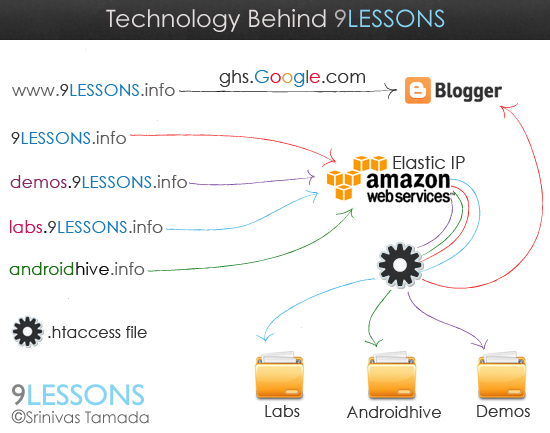
Why Blogger
It's powerful, fast and it is Google's product. 9lessons.info powered my many cloud services picasa for images, download scripts by box.net and revenue by Google adsense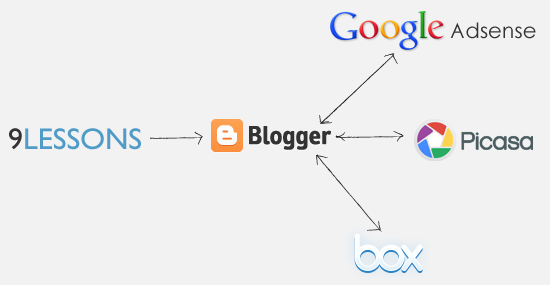
Domain Redirection
.htacces code for redirecting 9lessons.info to www.9lessons.info
RewriteEngine On
RewriteCond %{HTTP_HOST} ^9lessons.info
RewriteRule (.*) http://www.9lessons.info/$1 [R=301,L]
RewriteCond %{HTTP_HOST} ^9lessons.info
RewriteRule (.*) http://www.9lessons.info/$1 [R=301,L]
Sub Domain Redirection
Sub domain redirection mapping to folder. Here demos.9lessons.info connecting to demos folders.
RewriteCond %{HTTP_HOST} ^demos\.9lessons\.info$
RewriteCond %{REQUEST_URI} !^/demos/
RewriteRule (.*) /demos/$1
RewriteCond %{HTTP_HOST} ^labs\.9lessons\.info$
RewriteCond %{REQUEST_URI} !^/labs/
RewriteRule (.*) /labs/$1
RewriteCond %{REQUEST_URI} !^/demos/
RewriteRule (.*) /demos/$1
RewriteCond %{HTTP_HOST} ^labs\.9lessons\.info$
RewriteCond %{REQUEST_URI} !^/labs/
RewriteRule (.*) /labs/$1
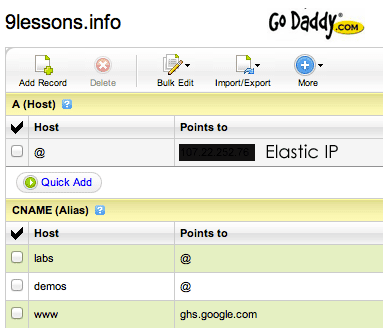
Godaddy DNS Settings
Other Domain
Same way third party domain redirection.
RewriteEngine On
RewriteCond %{HTTP_HOST} ^androidhive.info
RewriteRule (.*) http://www.androidhive.info/$1 [R=301,L]
RewriteCond %{HTTP_HOST} ^www\.androidhive\.info$
RewriteCond %{REQUEST_URI} !^/androidhive/
RewriteRule (.*) /androidhive/$1
RewriteCond %{HTTP_HOST} ^androidhive.info
RewriteRule (.*) http://www.androidhive.info/$1 [R=301,L]
RewriteCond %{HTTP_HOST} ^www\.androidhive\.info$
RewriteCond %{REQUEST_URI} !^/androidhive/
RewriteRule (.*) /androidhive/$1
Elastic IP Redirection
IP redirection to www.9lessons.info
<script>
window.location.href = "http://www.9lessons.info/";
</script>
window.location.href = "http://www.9lessons.info/";
</script>
My Favorite Tools and Fonts
Specially I love hand drawing effects. I'm using Adobe Illustrator and Photoshop for designing banners and here my favorite fonts.

 Download Fonts









You didn't included Helvetica in the Download List :(
ReplyDeletecan i host one of my blogger sub-domain on wordpress with Amazon EC2? what are the pricing for Amazon EC2?
ReplyDeleteIts always good to use Blogger, many awesome options are available including custom domain name registration.
ReplyDeleteBetter switch away from Go daddy hosting or else you visitors will switch away from your blog.
ReplyDeleteHow can you still be on go daddy ( fools supporting SOPA) while the whole world is switching.
I think i too wanna go for Amazon EC2
ReplyDelete@designs: Helvetica is part of all operating systems, don't need to downwload...
ReplyDeletegracias
ReplyDeleteDisappointing to see that you are still with godaddy...
ReplyDeleteCan you please help in one issue?
ReplyDelete1. I have successfully done so that [mydomain.net] points to my EC2 server.
2. Also in turns [mydomain.net] into [www.mydomain.net].
3. Even I've done so that it go [www/demos] when request [demos.mydomain.net]
But I have a blog [myname.blogspot.com]. What should I do so that [www.mydomain.net] points to [myname.blogspot.com]?
I have added CNAME [www]---[ghs.google.com] in DNS manager.
Can you please assist?
Hi Nuhil
ReplyDeleteGo to blogger blog Settings -> Publishing add your custom domain
I have my blog on tumblr. Would it be wise to move it to blogger. I think tumblr doesn't have a great text editor like for writing the scripts in colors. What do you say? Please reply.
ReplyDeleteThanks :) Got it and its working
ReplyDeleteHow do you fix up templating on blogger?
ReplyDeleteWaiting for this post since long ago. I will must do it for my blog. thanks for share this great tech behing 9lessons.
ReplyDeleteDear Srini,
ReplyDeleteY do you use .htaccess to control all your subdomain forwarding? you could still do it at goDaddy/any DNS manager itself.
I mean by using virtual host instead of .htaccess
ReplyDeletehi srinivas, can you please post a detailed tutorial on how to configure subdomains with webhosting? actually the word called ".htaccess" and how to implement this seems to be very unknown for a non-techie kind of person like me. I would be glad if you could help me out in this regard. Thanks
ReplyDeletegood on1
ReplyDeleteTechnology show good results, it always a best deal of getting new idea.
ReplyDeleteIf blogger.com provide me free hosting so why should I use amazon cloud?
ReplyDeleteWill blogger.com give this service in huge traffic flow?
I am waiting for your valuable answer.
Thanks for this valuable post. You are always rockzz :-)
Dude do you work in TCS ?
ReplyDelete@Sham
ReplyDeleteYes
nice
ReplyDeleteit very useful system wit large web pages. thank you
ReplyDeleteThanks for sharing this!
ReplyDeleteI'm planning to use Blogger and Amazon EC2.
Hi
ReplyDeleteFirst of all what is the link to Amazon EC2 ?
And with what you wrote can i upload my php mysql file on the server with my design ? Is it like a hosting where i can upload my website ?
Thank you for sharing the wonderful information.
ReplyDeleteWhat do u use to show demos ??
ReplyDelete@sathesh, He use Amazon EC2 for demo purpose
ReplyDeleteHi im new to web how the articles will be stored in your database(My SQL) or Google Database ?
ReplyDeleteI learned a better way, just change the httpd.conf
ReplyDeleteOn ssh:
$ sudo vi /etc/apache2/httpd.conf
Then, put
--------
Servername domain1.com
DocumentRoot /var/www/domain1
Servername domain2.com
DocumentRoot /var/www/domain2
---
Just it, done ;)
What is banifit of this type domain mapping.Would you please help me because i am new for this and i don't know anything about it.
ReplyDeletein which file do we add RewriteEngine On
ReplyDeleteRewriteCond %{HTTP_HOST} ^9lessons.info
RewriteRule (.*) http://www.9lessons.info/$1 [R=301,L] code and how
great tutorial... This information really helpful..but when youtube(bangladesh) blocked.it has effected blogger service...so blogger or own hosting, which is the best?thanks
ReplyDeleteHi,
ReplyDeleteFirst of all what is the link to Amazon EC2 ?
And with what you wrote can i upload my php mysql file on the server with my design ? Is it like a hosting where i can upload my website ?
Nice work...
ReplyDeleteHi, my redirection does not work. The only thing that works is the adding of www, each time I go the website it changes to www... and displays site can't be reached. I have a folder that contains my webapp and has index.php in it too. How do I make it work. Thank you in advance
ReplyDeleteTry with .htaccess redirections.
Delete