

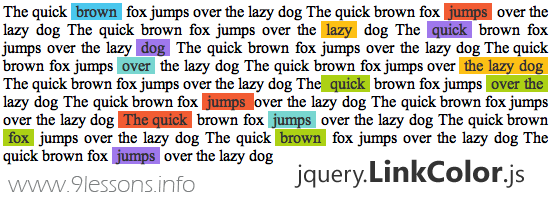
This post is explains how easy you can built a jQuery plugin, we made a simple plugin called LinkColor. It makes your website anchor links so colourful and pretty beautiful, Just few line of code and very simple to use. Follow the eight steps and learn how to create your own jquery plugin. Take a look the live demo. Thanks!
 Download Script
  Live Demo
Developer

jquery.LinkColor.js
/**
* jQuery LinkColor Plugin 1.0
*
* http://www.9lessons.info/
*
* Copyright (c) 2011 Arun Kumar Sekar
*/
(function($){
$.fn.LinkColors = function(){
//Link background colors
var colors = new Array('4AC7ED', 'FDC015', '9F78EC', 'F25C33');
return this.each(function(i,obj){
$this = $(this);
$anchors = $(obj).find("a").get();
$.each($anchors, function(j,ele){
var randColor = Math.floor ( Math.random() * colors.length );
$(ele).css({
'background-color':'#'+colors[randColor],
'text-decoration':'none',
'color':'#333333',
'padding':'0px 5px 0px 5px'
});
});
});
};
})(jQuery);
* jQuery LinkColor Plugin 1.0
*
* http://www.9lessons.info/
*
* Copyright (c) 2011 Arun Kumar Sekar
*/
(function($){
$.fn.LinkColors = function(){
//Link background colors
var colors = new Array('4AC7ED', 'FDC015', '9F78EC', 'F25C33');
return this.each(function(i,obj){
$this = $(this);
$anchors = $(obj).find("a").get();
$.each($anchors, function(j,ele){
var randColor = Math.floor ( Math.random() * colors.length );
$(ele).css({
'background-color':'#'+colors[randColor],
'text-decoration':'none',
'color':'#333333',
'padding':'0px 5px 0px 5px'
});
});
});
};
})(jQuery);
How to Use
<html>
<head>
<script src="https://ajax.googleapis.com/ajax/libs/jquery/1.6.2/jquery.js"></script>
<script src="jquery.LinkColor.js"></script>
<script type="text/javascript">
$(document).ready(function()
{
$('body').LinkColors();
});
</script>
</head>
<body>
...................
....Content...
...................
</body>
</html>
<head>
<script src="https://ajax.googleapis.com/ajax/libs/jquery/1.6.2/jquery.js"></script>
<script src="jquery.LinkColor.js"></script>
<script type="text/javascript">
$(document).ready(function()
{
$('body').LinkColors();
});
</script>
</head>
<body>
...................
....Content...
...................
</body>
</html>
How to Develop a jQuery Plugin from Scratch.
Step 1
(function($)
{
// --------------
})(jQuery);
{
// --------------
})(jQuery);
Step 2
fn is function identifier LinkColors is the plugin name.
$.fn.LinkColors = function()
{
// Plugin code ...
};
{
// Plugin code ...
};
Step 3
Initiating colors variables. You can add some more colors here based on your template color combinations.
var colors = new Array('4AC7ED', 'FDC015', '9F78EC', 'F25C33');
Step 4
Here this refers to selectors. You should use always each function, selectors may be more than one.
return this.each(function(i,obj)
{
//............
});
Step 5{
//............
});
Finding anchors from selectors Eg, body, #divName and .className .
$anchors = $(obj).find("a").get();
Step 6
Loop available anchors
$.each($anchors, function(j,ele)
{
//.............
});
Step 7{
//.............
});
Make a random keys from colors array
var randColor = Math.floor ( Math.random() * colors.length );
Step 8
Applying CSS style for anchor each obj
$(ele).css({
'background-color':'#'+colors[randColor],
'text-decoration':'none',
'color':'#333333',
'padding':'0px 5px 0px 5px'
});
'background-color':'#'+colors[randColor],
'text-decoration':'none',
'color':'#333333',
'padding':'0px 5px 0px 5px'
});








Good one , but it would be more useful if you had elaborated more on each step.
ReplyDeleteE.g: Step1 has more significance but no description here.
NICE NOT :-@
ReplyDeleteNice Work Man
ReplyDeleteHow about if I want to pass parameter to the call?
ReplyDeletee.g.passing color/ font-size
$('td').LinkColors({color:red, fontsize: 18});
@Leozzz
ReplyDeleteTo enable the plugin to accept parameters and define some defaults you would do the following:
// define parameters and give them default values
var defaults = {
color: 'black',
fontsize: 12
};
var options = $.extend(defaults, options);
You could then refer to those values within your plugin script by doing the following:
var color = options.color;
If you choose not to pass the parameters when you call the plugin it will simply use the defaults.
I'm learning myself but if you want to look at a workign example check this out http://jsfiddle.net/davelk/qZ5BP/1/. I created it because I needed to display live text input in a variety of places. It's my first purposeful plugin so feel free to let me know any way to improve it.
This is a great blog but it's lame that you have to approve comments. Can't you use a spam filter and then moderate where necessary?
ReplyDeleteNice article.Thank you.
ReplyDeletewerwerwe
ReplyDeleteGreat post, explains quite a lot but i've got some questions. Imma write them comment-like.
ReplyDelete$this = $(this); //why is this necessary?
$anchors = $(obj).find("a").get(); // what does .get method do here?
Nice article.
ReplyDeleteNice script Arun, my website will look much more colorful with this!
ReplyDeletevery good...!!!
ReplyDelete@Adam
ReplyDeleteI'm no expert, but I'll try take a shot here:
1.$this = $(this); //why is this necessary?
I think that line can be done away with as it $this is not being used anywhere.
2.$anchors = $(obj).find("a").get();
I'm assuming it will return an indexed array containing all anchors in the document.
Again, I could be wrong here.
Thanks man ! great help
ReplyDeleteReally nice post.. Help a lot to understand basic funda for creating plugins
ReplyDeleteVery nice tutorial!
ReplyDeleteA nice post ... Just dont create any jquery plugins that are already made ... a great resource will be http://jquer.in to check.
ReplyDeleteThanks
ReplyDeleteWhy add extra overhead to pages by doing this in jQuery. This can easily be done through the simple css and in more effective way.
ReplyDeleteThanks for sharing..
ReplyDeleteHow to make a plugin that has callback functions like init, before, after, complete etc.?
ReplyDelete